
Find out what's broken on your website before your customers do.
Paste your web address. Scout My Site opens your site in real browsers, tests it the way a visitor would, re-runs its live checks before reporting a problem, and uses AI to turn the results into a plain-English report with screenshots and what to fix first.
The things your visitors actually do
Scout My Site doesn't just check that pages exist. It uses your site the way a customer would, and tells you what's in the way.
Pages, links and images
Every page it reaches, up to your page limit: does it load, are links broken, do images show, does the layout hold together.
Forms and key buttons
Contact and sign-up forms accept good input and reject bad. Your main buttons, such as “Book a demo”, actually lead somewhere.
Search, cart and sign-in
Site search returns results. A product can go in the cart, change quantity and come out. Sign-in works with your test login.
Phones and screens
Most visitors use a phone. We check pages fit a phone screen without sideways scrolling or cut-off content.
Speed and health
Slow pages, script errors and failing background requests that quietly break menus, forms and prices.
Accessibility and basics
Keyboard use, screen-reader barriers, search-engine titles and descriptions, and basic security settings.
From web address to report in three steps
Point it at your site
Type your address and confirm you are allowed to test it. Optionally add a test login so it can check pages behind your sign-in.
It explores and tests
A real browser visits your pages on desktop and phone sizes, tries your forms, buttons, search and cart, and re-tests anything that looks wrong.
You read what matters
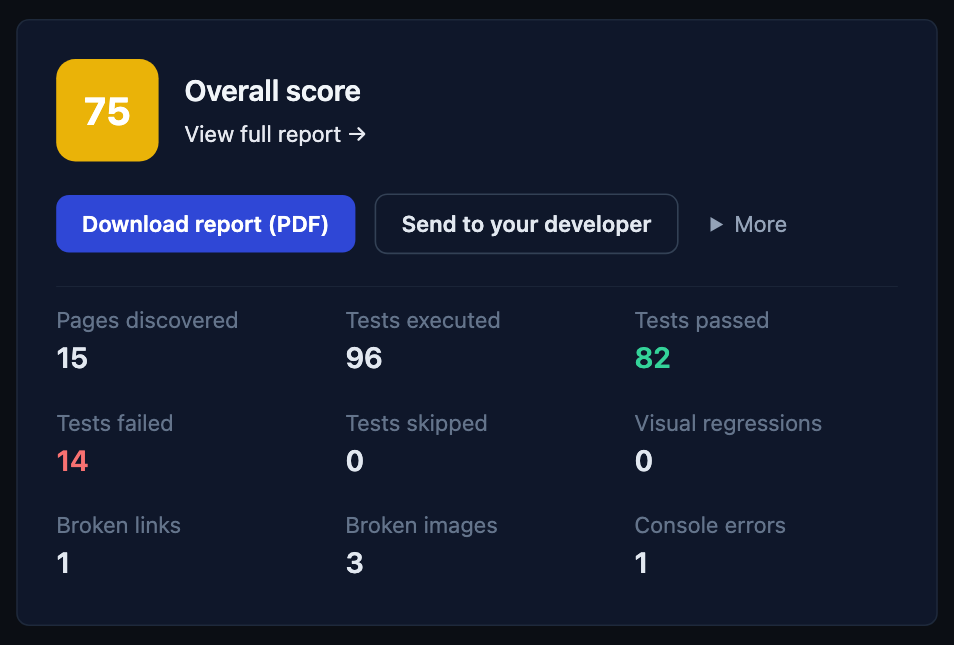
A score, a ranked “what to fix first” list in plain English, a screenshot of the affected page for each problem, a PDF for you, and a link your developer can open to see exactly what to fix.
A report you can read without a developer
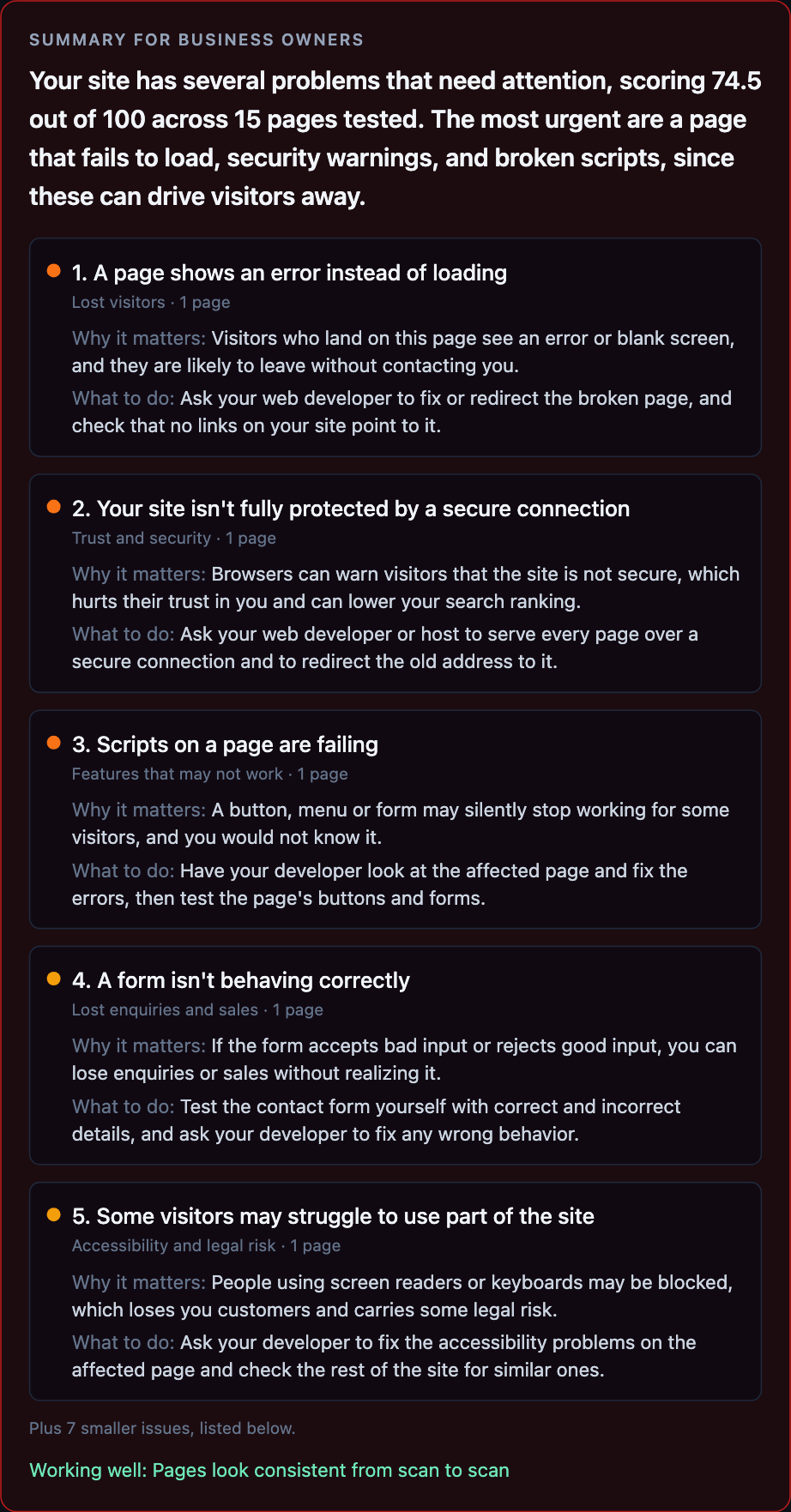
Technical tools hand you a wall of error codes. Scout My Site ranks problems by what they cost you, and explains each one.
- Ranked by business impact. A broken contact form outranks a blog accessibility issue.
- Why it matters, what to do. Every issue comes with both, in plain language.
- Key journeys. A list of what a visitor must be able to do on your site, and whether it worked when we tried it.
- One problem, one item. The same issue on 40 pages is shown once, with every page listed.
- A screenshot of the affected page for each finding, so you can see what we saw.
- Forward it to your developer. One link opens the exact elements, errors and a ready-made ticket for each problem. No account needed.
- Not a developer? Forward the link to whoever looks after your website; it explains each problem and how to reproduce it.
Tested by browsers. Explained by AI.
AI is great at explaining and ranking. It's not allowed to decide what is broken.
Real tests decide
Bugs come from fixed checks in a real browser, with evidence. The score is calculated by fixed rules. One exception: for an unclear visual change, AI gives a second opinion and the finding is marked as lower confidence.
Live checks are re-run
A failed live check (page load, form, button, cart, layout) is run again in a fresh session and is only reported if it happens again. Findings read from the page itself, such as console errors, security headers, alt text and accessibility, come with their exact evidence.
AI explains, with guardrails
AI labels page types, picks each page's main buttons to test, writes the plain-language wording and gives a second opinion on unclear visual changes. Your passwords are never sent to it.
Start free. Pay for what you need.
Check your home page for free, buy one full audit, or let us watch your site every week or every day.
Scan pass
One thorough audit, no commitment.
- One full audit of one website
- Up to 100 pages (discovery stops at 100 pages or 30 minutes)
- Plain-language report PDF, with the full scan report
- An interactive link to forward to your developer
- A screenshot for each problem
- Results kept for 30 days
- Automatic scans, alerts and uptime monitoring
Weekly
A check-up every week.
- A full scan every week, automatically
- Up to 200 pages per scan, 3,000 pages a month, 5 websites
- Alerts by email, Slack or webhook when something breaks
- What’s new and what’s fixed since your last scan
- Developer link and report PDF for every scan
- 90 days of history
- Uptime alerts and Firefox / Safari-engine checks
Daily
Checked every day, watched in between.
- Everything in Weekly, with a full scan every day
- Up to 200 pages per scan, 5,000 pages a month, 10 websites
- Uptime alerts by email: we check your home page every 10 minutes and warn you when it is down, and when it’s back
- A warning before your security certificate expires
- Firefox and Safari engine checks as well as Chrome
- Send findings to GitHub, Jira or Linear
What it doesn't do
It won't complete a checkout
We never pay for anything or submit your real forms. We test up to the cart and stop there.
It's not a full security audit
We check basic security settings (HTTPS, headers, cookies). It is not a penetration test.
No single sign-on or CAPTCHA logins
Pages behind single sign-on, two-step verification or CAPTCHA can't be tested yet. Everything public still can.
Quick answers
Do I need to install anything or write scripts?
No. You paste your web address and start. There is nothing to install and no test code to write.
Who can I scan?
Websites that you are authorized to test, such as your own site or a client's site. You confirm that before every scan, including the free home-page check. Owners of other sites can ask us to block their domain for good (see For website owners).
Will it change or break my live website?
No. It reads and clicks like a visitor. It fills in your contact forms and clicks send, but stops the message before it leaves, so nothing reaches you. It never places an order or makes a payment, and never follows “sign out” links. The cart check adds a product to a basket in a throwaway browser session and removes it again, and it never goes to checkout.
How long does a scan take?
A small site takes a few minutes. A site of 40 pages takes roughly 15 minutes, and a large one close to half an hour. You can close the page and come back: the results wait for you.
What does the $59 pass include, and how many pages?
One full audit of one website. Page discovery stops after 100 pages or 30 minutes, whichever comes first, and a small, fast site is usually done in 15 to 30 minutes; a large or slow site can take an hour or more. You get a plain-language report as a PDF (with the full scan report behind it), an interactive link you can forward to your developer, and your results are kept for 30 days. If the scan cannot test anything, for example because your site is unreachable, the pass is returned.
See what your visitors see.
Run a full audit of your website for $59. If we can't test it, you don't pay.